50 Bouquet Procreate Stamps Brushes for Effortless Florals
Creating intricate floral arrangements from scratch in a digital illustration can be a time-consuming process. You often find yourself layering petal after petal, adjusting shading, and trying to maintain consistency across a series of designs. This is where the 50 Bouquet Procreate Stamps Brushes set changes the workflow for digital artists and designers. Instead of drawing every single stem and bloom, you have a curated library of 50 distinct bouquet designs ready to be stamped onto your canvas. It’s a practical solution for anyone looking to add professional, botanical flair to their projects without spending hours on botanical illustration.
A Closer Look at the Floral Collection
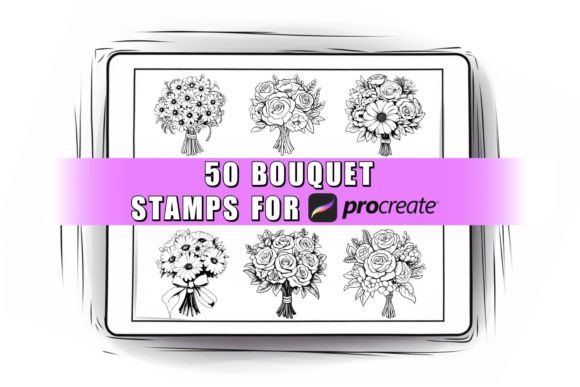
This isn't just a generic set of flower stamps. The collection includes a variety of different bouquet designs, each with its own personality and composition. You'll find everything from dense, romantic clusters of roses perfect for a wedding invitation to simpler, wildflower-style arrangements suited for a rustic brand identity. The visual style leans towards a modern, illustrated aesthetic—clean lines with enough detail to feel organic but not so much that they become visually cluttered at smaller sizes.
What makes this Procreate bouquet set particularly versatile is the control it gives you. Once you stamp a bouquet onto your layer, it becomes a fully editable element. You can instantly change the color to match your client's brand palette, adjust the opacity for a subtle background texture, or scale it dramatically for a bold focal point. Because these stamps are not pressure sensitive, they work flawlessly with an Apple Pencil, a third-party stylus, or even your finger, ensuring a consistent result every time you apply them. This consistency is a huge asset for maintaining a cohesive look across multiple assets.
Practical Applications for Designers and Creators
The real value of a tool like this is in its application across real-world projects. For the graphic designer or brand strategist, these bouquets are instant design assets. Use them to quickly mock up concepts for a florist's logo, create elegant packaging for a beauty product, or design social media graphics for a boutique. The ability to instantly place a professional floral element means you can iterate on layout and composition much faster.
For those in editorial design or publishing, think about how these stamps can enhance a magazine layout, a blog header, or a chapter title page in a self-published book. They add a layer of visual sophistication that engages the reader. Similarly, small business owners and entrepreneurs can leverage this set to create their own marketing materials. Designing a sale flyer, a thank-you card for customers, or product labels becomes a much more accessible task when you have high-quality, pre-drawn elements at your fingertips.
Even for hobbyists and crafters, the applications are endless. Personalize digital planners, create custom stationery, design unique prints for your home, or craft one-of-a-kind wedding invitations. The stamps serve as a foundation, but your creativity in color choice, composition, and pairing with typography is what makes each project unique.
Integrating Stamps into Your Design Workflow
Using a Procreate stamp set effectively is about more than just dropping an image onto a page. To get the most out of the 50 Bouquet Procreate Stamps, consider these practical tips:
- Layer Management: Always place your bouquet stamps on their own layer. This non-destructive approach allows you to easily move, resize, recolor, and apply effects without altering your underlying artwork or background.
- Color Harmony: Before you start stamping, define a color palette for your project. Use the Procreate color drop tool to quickly recolor the bouquets to fit within your scheme, ensuring visual harmony.
- Creating Depth: Use multiple bouquets at different sizes and opacities to create a sense of depth in your composition. A larger, more detailed bouquet in the foreground with a smaller, faded one in the background can add a professional layered effect.
- Font Pairing: The style of these bouquets pairs well with a range of typefaces. For a romantic or elegant feel, try combining them with a script font or a refined serif font. For a more modern, clean look, pair them with a bold sans serif font. The contrast between the organic floral shape and clean typography often creates a strong visual hierarchy.
Remember, this is a digital item for the Procreate App on Apple iPad only. It’s an instant download, meaning you can start using it immediately after purchase. While the colors on your screen may vary slightly from what you see in the product photos due to monitor differences, the underlying line work and composition are consistent. The license allows for both personal and commercial purposes, so you can use these designs in client work and products you sell. However, as with any digital asset, you cannot resell, share, or redistribute the brush files themselves.
In a landscape where visual content is king, having a reliable set of premium design assets like the 50 Bouquet Procreate Stamps Brushes can significantly streamline your creative process. It’s not about replacing your skill, but about augmenting it—giving you a professional starting point so you can focus on the bigger picture of your design, brand, or personal project. Whether you're finalizing a wedding suite, building a brand identity, or simply exploring your creative side, this set offers a practical and beautiful toolkit.