Bring Artistic Energy to Your Work with Scribble Brushes
Every designer knows the feeling: a project needs a spark of personality, a touch of the hand-made that digital tools often strip away. You want texture, energy, and a sense of authentic creativity without spending hours trying to manually draw each stroke. This is where a specialized tool like Scribble Brushes for Illustrator bridges the gap between technical precision and artistic flair. It’s not just another set of design assets; it’s a way to inject a human, artistic vibe directly into your vector workflow.
The Anatomy of Authentic Texture
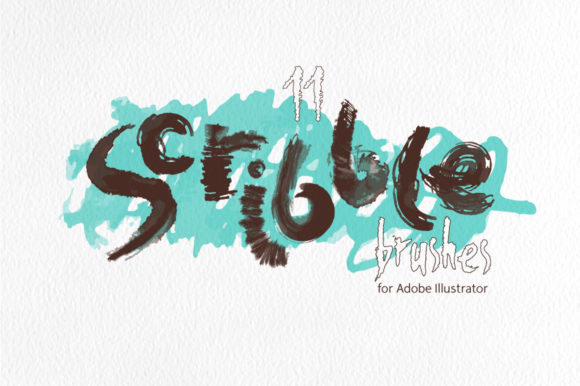
At its core, this collection is a set of 11 art brushes built from real, hand-painted watercolor and ink scribbles. The key differentiator is their foundation in reality. These aren't algorithmically generated perfect lines. They carry the subtle imperfections, varied pressure, and organic flow of a human hand holding a brush. The visual personality is raw, expressive, and slightly chaotic in the best way possible. You’ll see fine ink-like lines alongside broader, more textured strokes that mimic the bleed of watercolor on paper.
What makes them particularly useful for professional work is their construction as pure vector items. They don't rely on complex effects or blending modes that can cause compatibility headaches or slow down your file. Instead, they utilize four transparent gradations of a stroke color. This clever approach gives them a naturally detailed, realistic appearance—like a real paint stroke with areas of opacity and translucency—while keeping the underlying vector math clean and editable. This means you can use them confidently on any background, knowing they’ll render correctly and perform efficiently.
Practical Applications Across the Creative Spectrum
The true value of a creative font or brush set lies in its versatility. Where do these scribble brushes actually make a difference? The applications are broader than you might initially think.
For brand identity and logo design, they can add a distinctive, artisanal quality. Imagine a hand-lettered logotype for a boutique coffee roaster or a craft brewery where the underline or decorative swirl is one of these textured scribbles. It instantly communicates a story of craftsmanship. In editorial design and packaging design, they excel as dynamic background elements, section dividers, or as part of a larger illustration. A food blog header or a cosmetics package could use these strokes to frame text or create abstract patterns that feel energetic and modern.
For digital creators—marketers, bloggers, and social media managers—the brushes are a shortcut to creating engaging social media graphics. A quick scribble can highlight a quote, create a custom bullet point, or form the basis of an eye-catching Instagram story background. Because they are vectors, you can scale them for a web design banner or a high-resolution print poster without any loss of quality. The included JPG and PNG files at 5000x5000px make them immediately usable in non-vector programs like Canva or Photoshop for quick projects.
Integrating Scribbles into Your Design Process
Adopting a new design element requires a thoughtful approach to maintain professionalism and coherence. Here’s how to think about using these brushes effectively.
Evaluating Project Fit: First, assess the tone of your project. These brushes have a distinct personality—playful, artistic, and human. They are perfect for brands that want to appear approachable, creative, and authentic. They might be less suitable for a law firm’s annual report or a ultra-minimalist tech startup’s UI, where clean, predictable lines are paramount. Think of them as a premium font for your toolkit: you wouldn’t use a script font for body text, but for a headline or accent, it’s perfect.
Font Pairing and Visual Hierarchy: The goal is contrast and balance. Pair these expressive scribbles with clean, neutral typefaces. A bold sans serif font like Helvetica or a classic serif font like Garamond can provide a stable foundation that lets the scribble’s energy stand out without overwhelming the viewer. Use the brushes to create visual hierarchy—a large, textured scribble can draw the eye to a key message or a call-to-action, while a smaller one can subtly emphasize a subheading.
Customization is Key: Don’t just drop them in as-is. Change the stroke color to match your brand palette. Adjust the stroke weight to make them bolder or more delicate. Combine two or three brushes to create a unique, layered mark. Because they are easy to edit vector files in Adobe Illustrator 10 and higher, you have full control. This customization is what transforms them from a generic asset into a unique part of your brand identity.
What You’re Getting: A Complete Toolkit
The package is designed for flexibility. You receive a vector AI CS5 file with all 11 brushes pre-loaded on the brush panel, ready for immediate use. An EPS file provides compatibility with other vector software, and an SVG file offers further flexibility for web projects. The inclusion of 11 individual SVG files is a thoughtful touch, allowing you to use a single brush in a web project without loading the entire set. The high-resolution JPG and PNG files on a transparent background ensure you’re covered for every possible workflow, from professional print to quick digital mockups.
In the crowded space of design assets, finding tools that offer genuine artistic value and practical utility is rare. These Scribble Brushes for Illustrator provide a specific, high-quality solution for adding organic, hand-crafted texture to digital projects. They empower designers, entrepreneurs, and creators to produce work that feels personal and visually dynamic, all while maintaining the scalability and editability of professional vector graphics. It’s about giving your work a voice that is unmistakably human.