Transform Your Illustrations with the Ultimate Brush Bundle
Every digital artist knows that the right tools can make the difference between a good piece and a great one. When working in Clip Studio Paint, the software is only half the equation. The other half is the brushes you use. If you have ever felt limited by the default options or struggled to find the perfect texture for a specific element in your work, you know how frustrating it can be. That is exactly why I put together the Bundle Pack | 30 Brushes for Clip Studio. It is a curated collection designed to solve real problems and expand your creative range without overwhelming you.
This pack is not just a random assortment of tools. It is a carefully selected group of five distinct sets that I have developed and refined through my own professional work. Each set addresses a specific need in the illustration process, from the initial sketch to the final details. The goal is to give you a versatile toolkit that feels intuitive and helps you achieve the look you want more efficiently. Whether you are a seasoned professional or just starting out, having reliable, high-quality brushes at your fingertips saves time and improves results.
A Closer Look at What is Inside the Pack
The Bundle Pack | 30 Brushes for Clip Studio includes five complete sets, each with its own personality and purpose. Let me walk you through what you get and how each one can fit into your workflow.
The INK set is all about precision and expression. These brushes are perfect for line art, inking comic pages, or adding bold outlines to character designs. They offer a range of textures, from smooth, clean lines to rough, organic strokes. This set helps you create consistent, professional-looking ink work that stands out.
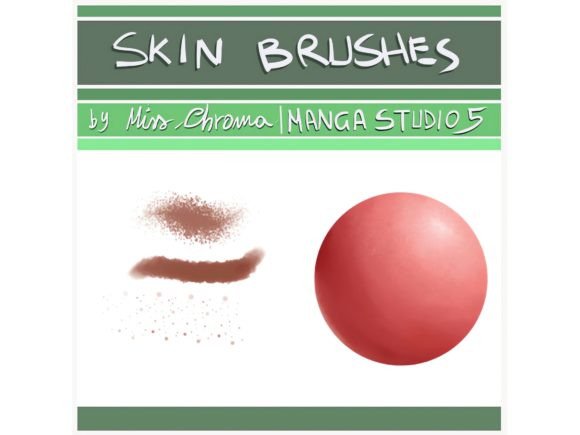
Next is the Skin set. Painting realistic skin can be one of the trickiest parts of digital illustration. These brushes are designed to help you build up skin tones smoothly and add subtle texture. They blend well and allow for soft shading, making them ideal for portraits, character art, or any project where lifelike skin rendering is key.
The Sai Watercolour set brings a beautiful, fluid aesthetic to your digital canvas. These brushes mimic the look and feel of traditional watercolor paints. They are fantastic for creating soft backgrounds, dreamy atmospheres, or adding a hand-painted touch to your illustrations. The way they mix and blend on screen can add a unique, artistic quality to your work.
If you are looking for a solid foundation, the Base SAI default set is your go-to. These are versatile, all-purpose brushes that work well for blocking in colors, sketching, and general painting. They are the workhorses of the pack, reliable for almost any task you throw at them.
Finally, the Lace brushes add intricate detail with minimal effort. These are perfect for adding delicate patterns, textures, or decorative elements to clothing, backgrounds, or frames. They can save you hours of manual drawing and help you achieve a polished, detailed look in your designs.
Where This Brush Pack Truly Shines
The versatility of the Bundle Pack | 30 Brushes for Clip Studio means it can be used across a wide range of projects. For graphic designers working on brand identity, these brushes can help create unique logo elements, textured backgrounds, or custom illustrations that set a brand apart. The ability to produce hand-crafted effects digitally is a huge asset in a crowded market.
Content creators and social media managers will find the watercolor and ink brushes especially useful for creating eye-catching social media graphics that do not look like generic templates. Adding a personal, illustrated touch to posts can significantly boost engagement and make your feed more memorable.
For those in publishing and editorial design, the pack offers tools for creating custom chapter headers, decorative elements, or full-page illustrations that enhance the reader's experience. The lace brushes, for instance, are perfect for adding elegant borders or motifs to book covers or magazine layouts.
Hobbyists and crafters can use these brushes to design patterns for fabric, create digital scrapbooking elements, or simply enjoy the process of making art with tools that feel natural and responsive. The pack is designed to be accessible, so you do not need to be a technical expert to get great results.
Making the Most of Your New Tools
Getting the most out of the Bundle Pack | 30 Brushes for Clip Studio involves a little experimentation. I recommend starting with the Base SAI default set for your initial sketches and color blocking. Once you have your composition down, switch to the specialized sets for the details. Use the INK set for your outlines, the Skin set for character work, and the Sai Watercolour brushes for atmospheric effects.
Do not be afraid to mix and match. Sometimes, a watercolor brush used for a background can create a beautiful contrast with a sharply inked foreground element. The key is to play around and see what combinations work best for your style and the specific project you are working on.
When it comes to font pairing in design projects where you incorporate your illustrations, consider the mood of the brushes. The organic, textured feel of the ink and watercolor brushes pairs well with serif fonts or handwritten fonts for a classic, artistic look. For a more modern, clean design, using a sans serif font can provide a nice balance to the detailed brushwork.
Remember, the goal of any design asset is to make your creative process smoother and your final product better. This brush pack is built to be a practical addition to your toolkit. It is not about flashy effects, but about giving you reliable, high-quality options to bring your vision to life. Whether you are working on a client project or personal art, having the right brushes on hand makes all the difference.