Unleash Authentic Texture: Roller Brushes for Illustrator
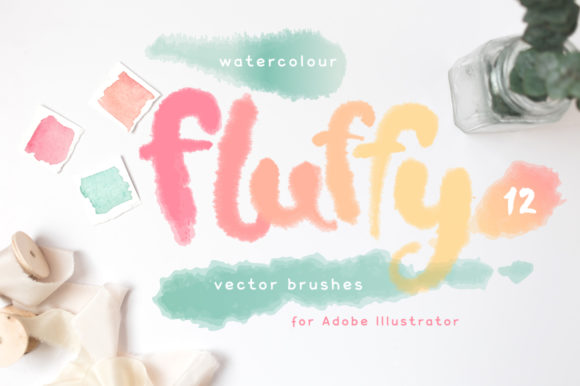
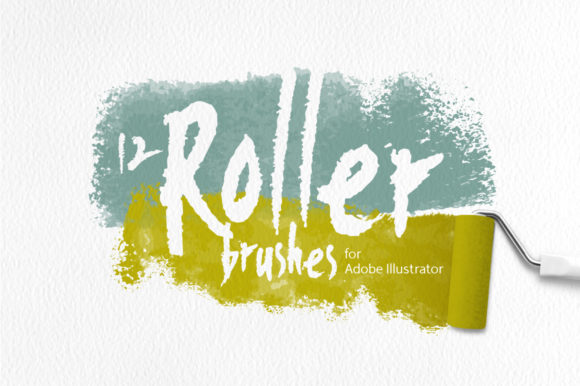
In the digital design world, achieving the organic, imperfect texture of traditional media can feel like a constant struggle. We spend hours trying to replicate the subtle bleed of watercolor or the uneven coverage of a bristly brush. This is where a dedicated set of Roller Brushes for Illustrator changes the game. This collection of 12 assorted vector art brushes is built from real watercolor brush strokes, offering a shortcut to genuine, handcrafted aesthetics without the mess or the learning curve of physical paint.
The Authentic Watercolor Appeal
What sets these brushes apart is their foundation in reality. They aren't algorithmic approximations. Each brush in the set captures the unique character of a real brush meeting paper, complete with the natural variations in width, opacity, and edge texture that make watercolor so beloved. The personality is inherently artistic and slightly unpredictable, perfect for designs that need to feel human and approachable. The style avoids the sterile perfection of vector defaults, instead embracing the charming imperfections that give work depth and warmth. The overall appeal lies in this authenticity; they provide the visual richness of a hand-painted piece with the scalability and editability of a vector file.
Crucially, these are pure vector tools. The set includes 12 brushes, each defined by four transparent gradations of a stroke color. This means you control the color and opacity entirely through your Illustrator settings—no complex effects, blending modes, or transparency masks are baked in. This simplicity is a strength, making them incredibly easy to use and customize for any project. They function seamlessly as true Adobe Illustrator art brushes, allowing you to draw with them or apply them to existing paths for instant texture.
Where Roller Brushes Shine: Practical Applications
The versatility of this set makes it a valuable design asset for a wide range of creators. For graphic designers and brand strategists, these brushes are a secret weapon for developing a distinctive brand identity. They can be used to create unique logo elements, textured backgrounds for websites and social media, or custom icons that stand out in a sea of flat design. The organic feel is particularly effective for brands in the wellness, artisanal food, craft, or education sectors, where conveying authenticity and a personal touch is paramount.
Marketers and content creators will find them indispensable for social media graphics. A quick, textured brushstroke can serve as an eye-catching frame for a quote, a dynamic underline, or a standalone graphic element that stops the scroll. The brushes are equally at home in editorial design and packaging design, where they can add tactile interest to layouts, create whimsical borders, or illustrate concepts with a softer, more artistic flair than standard geometric shapes. For hobbyists and crafters, they open up new possibilities for creating custom art prints, greeting cards, and digital planners with a professional, handcrafted look.
Integrating Texture into Your Design Workflow
Choosing the right tool is only half the battle; knowing how to use it effectively is what elevates your work. When considering these Roller Brushes for Illustrator, think about the emotional tone of your project. Their inherent warmth and artistry might not suit a sleek, high-tech corporate report, but they are perfect for a boutique bakery's menu, a yoga studio's promotional materials, or a children's book illustration. Always test the brushes at the scale they will be viewed. Their detail is beautiful up close, but ensure the texture remains impactful when scaled down for a small web banner or a business card.
A key consideration is font pairing. The organic nature of the brush textures pairs beautifully with clean, sans serif typefaces for a balanced contrast. A modern typography set with generous whitespace can let the textured elements breathe and stand out. Alternatively, pairing them with a script font or a handwritten font can create a fully cohesive, artisanal aesthetic. The goal is to create a visual hierarchy where the textured elements enhance, rather than compete with, your message. Since the brushes are based on four transparent gradations, you can easily adjust the stroke weight and color opacity to control their prominence, ensuring readability remains a priority in web design and print layouts.
From a practical standpoint, the package delivers exceptional value. You receive the brushes in a native Adobe Illustrator (.ai) file, a widely compatible EPS10 file, and both a bundled and individual SVG files for maximum flexibility. The high-resolution JPG and PNG versions (5000x5000px) are perfect for use as textures in other programs like Photoshop or Procreate. This multi-format approach means you're investing in a tool that will integrate smoothly into your existing workflow, whether you're a seasoned professional or just starting to explore vector art. It's a practical, no-nonsense addition to your toolkit for anyone looking to infuse their digital work with the soul of traditional art.