Watercolor Brush Photoshop: Elevate Your Digital Artistry
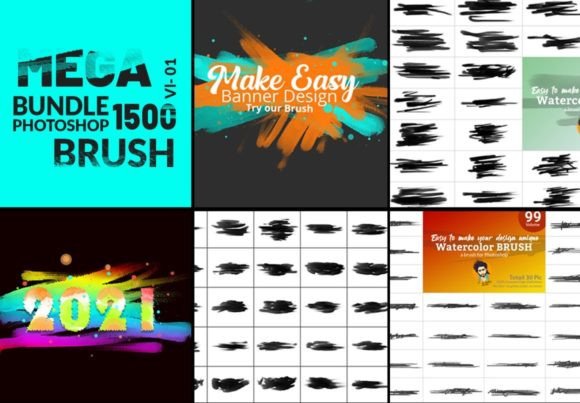
There's a particular magic in watercolor—the way pigment bleeds and blooms, the happy accidents of wet-on-wet technique, the textures that feel both organic and unpredictable. For years, digital artists have chased that authenticity, often settling for flat, lifeless filters. The Watercolor Brush Photoshop bundle changes that conversation entirely. With 1500 high-definition brushes designed to mimic the real thing, this collection isn't just another set of tools; it's a bridge between traditional artistry and digital efficiency.
Understanding the Anatomy of a Watercolor Brush
What separates a convincing digital watercolor effect from a generic overlay? Texture and behavior. These brushes are engineered at 2000 and 1500 pixels with 300 DPI resolution, meaning they hold their detail whether you're working on a large-format print or a social media graphic. The Auto Texture Edit option is particularly noteworthy—it automatically introduces subtle variations in opacity and edge softness, mimicking how real watercolor interacts with paper grain. You get organic-looking results without manually adjusting every stroke.
Think about the projects where authenticity matters most. A bakery's brand identity that needs warmth and handcrafted appeal. A wedding invitation suite that should feel personal and elegant. An indie book cover that demands emotional resonance. In these contexts, a flat digital gradient feels sterile. The Watercolor Brush Photoshop set delivers the personality, the slight imperfections, and the luminous layering that make viewers feel something. It's a creative font for your visual language, speaking directly to audiences who value craftsmanship.
Where These Brushes Truly Shine: Practical Applications
The versatility here is impressive. Because the brushes respond dynamically to pressure and color settings, they adapt to your workflow rather than forcing you into a rigid template. For logo design, a single watercolor brushstroke can become a distinctive brand mark—think of artisanal food brands or boutique studios. In editorial design, these brushes create compelling headers, pull quotes, or background textures that guide the reader's eye without overwhelming the text. They function beautifully as a display font alternative, adding visual hierarchy through texture rather than just typography.
Consider your packaging design needs. A natural skincare line might use watercolor washes on labels to communicate purity and botanical ingredients. A craft brewery could employ bold brushstrokes on can designs to convey creativity and boldness. The brushes work across any color palette—set them to deep blues for a corporate wellness brand or vibrant oranges for a summer festival poster. The "look is perfect" regardless of color because the texture and behavior remain consistently authentic.
Digital and Print Flexibility
For web design and social media graphics, these brushes add depth that flat colors can't achieve. Use them for hero image backgrounds, custom dividers, or animated elements in video content. The included video tutorial demonstrates techniques you might not discover on your own—how to layer multiple strokes, blend colors naturally, and create cohesive compositions. That practical guidance is invaluable, especially when you're integrating these assets into an existing brand identity system.
On the print side, the 300 DPI specification ensures crisp reproduction on everything from business cards to large posters. The freehand custom nature of the brushes means you can create unique textures for each project while maintaining a recognizable style. This consistency is crucial for building brand recognition across multiple touchpoints—your website, your packaging, your promotional materials all share the same visual DNA.
Integrating Watercolor Elements Into Your Design Process
How do you actually work with 1500 brushes without feeling overwhelmed? Start by categorizing them by texture type and opacity. Create a small library of favorites for different project types. For a marketing campaign, you might select brushes that create soft, translucent washes for background elements and more saturated, textured strokes for focal points. This approach mirrors how you'd choose a font pairing—selecting complementary elements that work together harmoniously.
Remember that these brushes are design assets, not just filters. Use them to create custom patterns, unique text effects, or hand-drawn illustrations that set your work apart. A blogger could use them to design distinctive featured images that become instantly recognizable in a crowded feed. A small business owner might create a series of social media templates with consistent watercolor elements, saving time while maintaining a professional, cohesive look.
The real value lies in how these tools expand your creative vocabulary. They encourage experimentation—the "Auto Texture Edit" feature removes the pressure to create perfect strokes, embracing the beautiful unpredictability that makes watercolor so compelling. Whether you're a seasoned designer looking to add a new dimension to your portfolio or a hobbyist wanting to elevate personal projects, this collection offers both immediate results and long-term creative growth. It's not about replacing your existing skills, but enhancing them with textures that feel genuinely artistic.