Watercolor Floral Brushes for Photoshop: A Designer's Botanical Toolkit
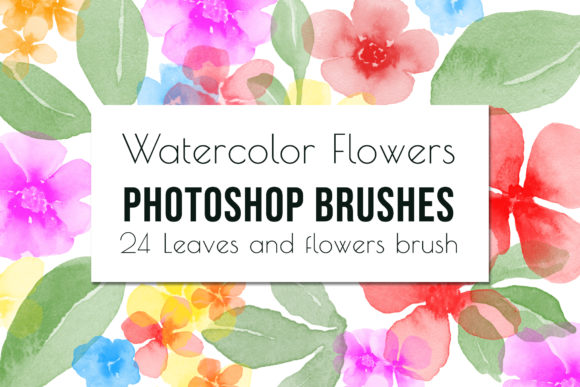
There's a particular magic in watercolor art—that beautiful, unpredictable bleed of pigment on paper, the soft edges, and the organic texture that feels both delicate and bold. For digital creators, capturing that authentic, hand-painted essence can be a challenge. This is precisely where a specialized resource like Watercolor Floral Brushes for Photoshop becomes invaluable. It's not just a set of digital stamps; it's a bridge between traditional artistry and modern design efficiency, offering a curated library of 24 hand-painted floral elements ready to be stamped directly onto your digital canvas.
Beyond a Simple Stamp: Understanding the Asset's Character
Let's be clear: this isn't a standard, uniform vector brush set. Each of the 24 brushes in this collection is a scanned, high-resolution artifact from original watercolor paintings. You'll find a variety of flowers and leaves Photoshop Brushes—think loose rose blooms, delicate fern fronds, clusters of berries, and graceful leaf sprays. The personality of these brushes is distinctly organic, artistic, and slightly imperfect, which is their greatest strength. They introduce a layer of authenticity and warmth that purely digital shapes often lack. The visual style leans towards a soft, romantic aesthetic with nuanced color gradients and textured edges, making them ideal for projects that need a human touch.
The practical appeal for a busy designer, marketer, or small business owner is immense. Instead of spending hours painting individual florals from scratch for each project, you have an instant library of design assets. This is a premium font equivalent for illustrative elements—a resource that elevates your work and saves significant production time. The included .abr file works seamlessly within Adobe Photoshop CC, integrating directly into your existing workflow. Once loaded via the Presets-Preset Manager, you can select any brush, choose a color, and stamp it onto your layer. This simplicity allows for rapid experimentation and iteration.
Where These Brushes Truly Bloom: Practical Applications
The versatility of this digital brush set is where it truly shines, finding a home across a surprising range of professional and personal projects. Consider these realistic applications:
- Wedding Stationery & Event Design: Create bespoke save-the-dates, invitations, and program covers with a cohesive, handcrafted feel. The brushes are perfect for building delicate borders, corner accents, or as central motifs on RSVP cards.
- Brand Identity & Marketing Materials: For brands in the wellness, beauty, lifestyle, or artisan food space, these brushes can soften a visual identity. Use them to create unique logo design accents, pattern fills for packaging, or textured backgrounds for social media graphics that stand out in a feed.
- Editorial & Publishing Design: Add sophisticated flourishes to magazine layouts, book chapter headings, or blog post graphics. They work beautifully as spot illustrations in editorial design, breaking up text and guiding the reader's eye.
- Digital Products & Content Creation: Designers and bloggers can use them to create printable art, digital planner stickers, or YouTube video overlays. The brushes are excellent for generating digital embellishments and scrapbook accents for a cohesive product line.
- Personal & Hobbyist Projects: From crafting custom greeting cards to designing wall art for your home or creating layered photo edits, the creative possibilities are boundless for hobbyists.
Integrating Florals into Your Design Strategy
Using Watercolor Floral Brushes for Photoshop effectively requires more than just stamping a flower onto a blank page. It's about thoughtful integration into your overall design assets and visual hierarchy. Here’s some practical guidance:
- Evaluate Project Fit: These brushes carry a specific stylistic voice. They are ideal for projects aiming for an organic, handmade, elegant, or whimsical feel. They might be less suited for a stark, ultra-modern tech brand, but perfect for a boutique bakery or a yoga studio.
- Consider Scale and Composition: A single, large bloom can serve as a powerful focal point. Smaller leaves and sprigs are excellent for creating subtle texture or framing text. Don't be afraid to layer multiple stamps and adjust their opacity or blending modes (like Multiply or Overlay) for depth.
- Mind the Context: Pair these organic elements with clean, simple typography. A sans serif font or a clean serif font often provides a perfect counterbalance to the detailed brushwork, ensuring your message remains readable. This thoughtful font pairing prevents visual competition and strengthens your brand identity.
- Test and Refine: Always test your composition at the final intended size, whether for a small business card or a large printed poster. Ensure the detail is visible and the elements don't clutter the design. The professional look comes from restraint and purposeful placement.
Remember, this is a digital file resource. Its value is unlocked through your creative application. The brushes are a starting point—a menu of artistic possibilities. By understanding their inherent style and strategically applying them across your web design, print materials, and digital content, you can consistently produce work that feels both professionally polished and uniquely personal. It’s an investment in a versatile component of your creative toolkit, one that brings the timeless appeal of watercolor florals into the efficient realm of digital design.